Automate the whole job
on one canvas.
Pick what starts the job, drop in AI steps that read your data and decide, connect any of 458 apps, and watch every run play out step by step. TinyWorkflows turns the busywork between your tools into one visual flow you can trust.
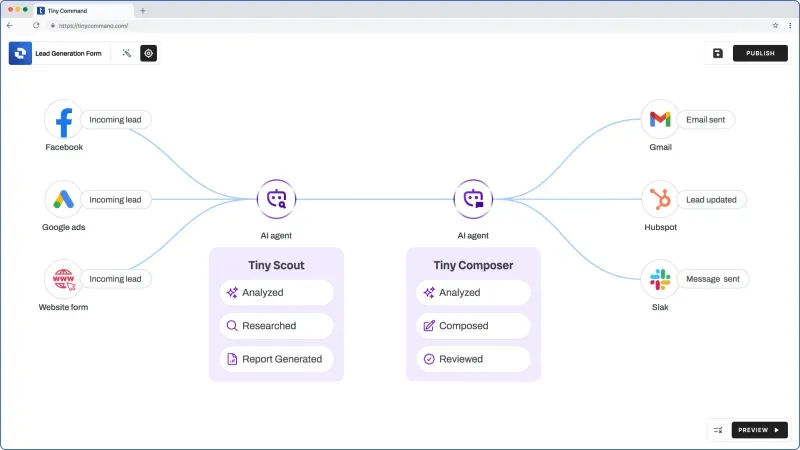
AI is a step, not an afterthought.
Drop in a TinyAI, research, writing, search, page-reading or document-reading step, point it at the data flowing through, and let it pull out what matters mid-flow. You watch the thinking happen, step by step.
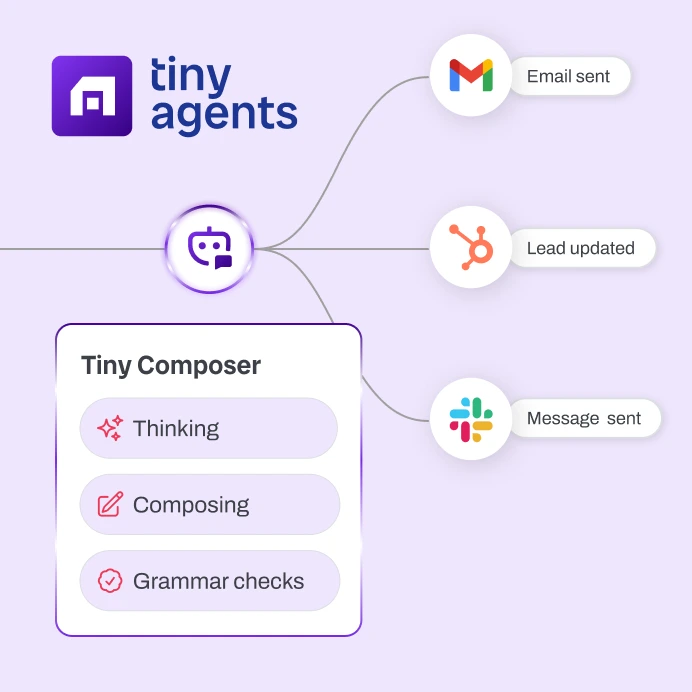

Each AI step sees the result of the step before it and feeds the next one. No copy-paste between tools.

Live status like Thinking, Composing and Grammar checks streams as the step runs.

TinyAI, research, writing, search, page-reading and document-reading are built-in steps, not an outside tool you have to bolt on.
458 apps your work already lives in.
The number is real. TinyWorkflows connects to 458 apps, the same set behind every integration page on the site. Connect an account once and each of its actions becomes a step you can drop on the canvas.


60-plus kinds of step, one builder.
Ways to start, branches, loops, waits, AI, finding people and companies, and a stop for human sign-off. Drag what the job needs onto the canvas and connect it. These are real step families from the builder.
 A form is filled out
 Another app pings it
 On a schedule
 A row changes
 Branch
 For each
 Call another app
 Formula
 Combine
 TinyAITinyScoutTinyComposer
 TinySearchTinyScrape
 TinyVision
 Look up a person
 Look up a company
 Find an email
 Add a row
 Update a row
 Find or remove
 Human approval
 Run it yourself
Branch, loop, and pause without writing code.
Real decisions, right on the canvas. Send each run down the right path, repeat a step over a whole list, and wait when you need to. And when you need a formula, describe it in plain English and AI writes it for you.
Set the conditions, group them with and / or, and each run takes the path that fits.
Run a step across every row, item or page until the work is done.
Reshape, add up and merge results between steps so the next one gets exactly what it needs.
Hold the run for as long as the step needs before the next one fires.
Formula helperYour data has a home right here.
Add, update, look up and remove rows in your own TinyTables, right inside the flow. A workflow keeps and reads its own data, with no separate database to set up, pay for, and reconnect.
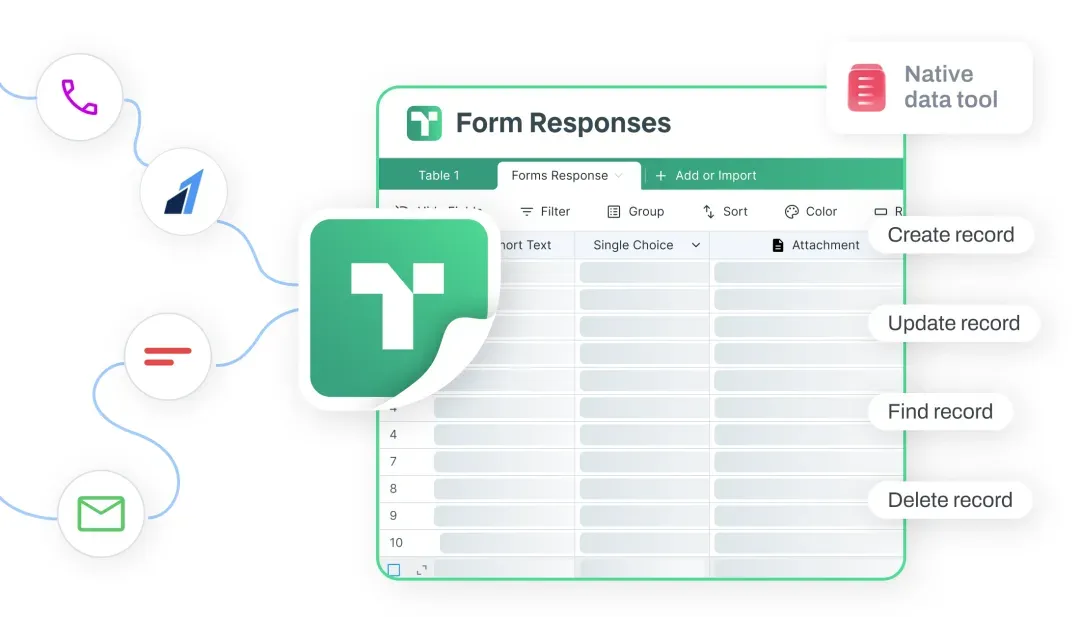
Write a new row or change an existing one as the run plays out. A real row, owned by you.
Look a row up to use it in the next step, or take it out. Built in, not a rented attachment.
Your data and your automations live together, so the table a form fills is the same table the workflow reads.
Watch every run, step by step.
Every run lights up the canvas as it happens, and each step is saved with what went in, what came out, how long it took, and anything that went wrong. When something breaks you read exactly what happened instead of guessing. Blue means running, green means done, red means it broke.
A form is filled outsuccess12msInput
{ "trigger": "form_submit" }Output
{ "email": "sam@acme.io",
  "company": "Acme" }
TinyScout · researchsuccess840msInput
{ "company": "Acme" }Output
{ "industry": "SaaS",
  "intentScore": 82 }
If intentScore > 70true3msCondition
intentScore (82) > 70
Branch
→ "hot lead"Update a rowrunning…Input
{ "status": "qualified" }Output
writing row…
Start from a sentence, finish on the canvas.
Describe what you want and AI lays out a starter workflow for you, then opens it on the canvas so you can connect accounts and fine-tune it. You get a head start you can see and change, with no black box.
Describe your workflowIt sets out what kicks it off, the steps in between and the actions, so you are not staring at a blank canvas.
Open it on the real canvas, sign in to your accounts, and adjust any step before you publish.
Run it on a sample, read what each step did, and only then make it live.
Publish it, and let it run on its own.
Start a workflow however the work starts: someone fills out a form, a schedule comes around, a row changes in your table, another app pings it, or you run it yourself. Publish once and it runs every time.
A TinyForm answer kicks off the flow the moment someone hits submit.
Any outside app can set the workflow off when something happens on its end.
Run on a set time or repeating schedule, on whatever cadence the job needs.
A new or updated row in your TinyTable starts the run automatically.
Your own software can run the workflow and get the full result straight back.
Set it off from the canvas any time you want to run it on demand.
// run it, and get back what each step produced
{
  "form":          { "email": "sam@acme.io" },
  "research":      { "intentScore": 82 },
  "update_row":    { "status": "qualified" }
}
Where it fits next to the tools you know.
Everyone here automates work. The difference is whether the AI, your data and a clear record of what ran all live on the same canvas, or in three more products you stitch together.
| TinyWorkflows | Zapier | Make | n8n | Pipedream | |
|---|---|---|---|---|---|
| AI is a built-in step that reads and decides | ✓ | via AI step | via modules | via nodes | via actions or code |
| A database that comes with it, owned by you | ✓ | included; paid tiers | data stores | data tables | key-value store |
| Watch each run play out live, step by step | ✓ | limited | basic | basic | logs |
| Nothing to host or run yourself | ✓ | ✓ | ✓ | cloud or self-host | ✓ |
| Starts from a form or a table row | ✓ | via apps | via apps | build it | code it |
| Branch, loop and wait on a canvas | ✓ | limited | ✓ | ✓ | code |
| Plain-English formula helper | ✓ | via AI assist | via AI assist | via AI assist | via AI assist |
If you want the biggest app directory and the simplest two-app link, Zapier is the safe default. If you love an open, self-hosted canvas, n8n is excellent. If you want AI, your data and a clear record of every run in one place that also runs your forms and tables, that is what we built.
Good to know.
How many apps can I connect? +
458 apps, the same set behind every integration page on our site. Connect an account once and each of its actions becomes a step you can drop on the canvas.
Is the AI really built in, or is it a bolt-on? +
It is a built-in step. TinyAI, research, writing, search, page-reading and document-reading are steps that read the result before them and feed the next one, with live status as they run. You do not have to wire up any outside AI tool yourself.
Where does my workflow data live? +
In your own TinyTables, real tables you own. Add, update, look up and remove rows as the run plays out. There is no separate database to set up, pay for, and reconnect.
Can I see why a run failed? +
Yes. Every run lights up the canvas step by step, and each step is saved with what went in, what came out, how long it took, and anything that went wrong. You read exactly what ran and where it broke instead of guessing.
How does a workflow get started? +
Someone fills out a form, a schedule comes around, a row changes in your table, another app pings it, or you run it yourself. A published workflow can also be run from your own software and hand back the full result.
Does the AI build the whole thing for me? +
It gives you a head start. AI lays out a starter workflow from your description, then opens it on the canvas so you connect accounts, adjust the steps and test before you publish.
Is there a free plan? +
Yes. Build and publish a workflow for free and start running it right away. You are in the builder in under a minute.
Every step, from first hello to follow-up, in one place.
No wiring to build. Every step hands off to the next on its own.
 01Forms
A lead arrives
in 02Tables
Saved and enriched
on file 03Agents
Scored and researched for you
scored 04Workflows
Routed the right way
routed 05Email
The right email sends
sent
All it takes is a TinyCommand.
Five products. One system. One place everything lands.
Build the workflow once. Let it act every time.
Something kicks it off, AI reads the data and decides, your apps act, all on one canvas with 458 connected apps and a run history you can trust. Free to start.